Pricing & Item Maintenance
Price changes drive margin. S4 Back Office is built to make pricing fast, consistent, and synced across your POS and…
Key features
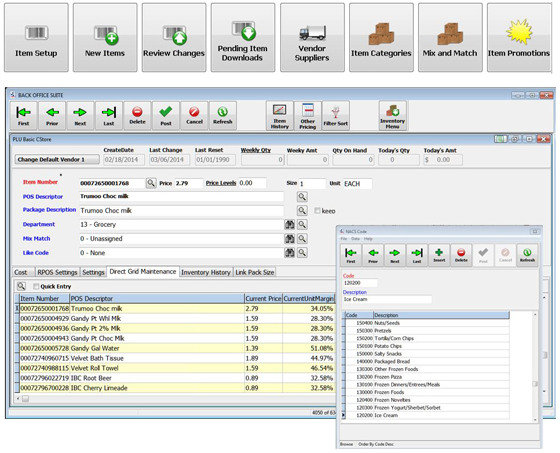
Direct & batch item edits
One-click index changes, UPC Keep, mass change direct or by batch, layered allowances on cost.
Pricing automation
Auto-price and rounding calculators off cost, allowance pass-through formulas, rule-based batch activation and deactivation.
Customizable grid view
Color-coded indicators on changed data fields, like-item linking, multiple vendors per item, group reporting links.
Integrated shelf signage
Build and verify ads in-aisle, integrated sign and label printing, interfaces to deli and meat scale systems.
What's included
- Support for all POS statuses, bottle links, and mix-match tables
- Frequent shopper pricing and electronic couponing
- Complex promotional schemes unique to each POS system
- Handle increases and decreases in a single batch, scored separately
- Multi-store and corporate-zone pricing supported via S4 Enterprise
Price changes drive margin. S4 Back Office is built to make pricing fast, consistent, and synced across your POS and your shelves.
This module handles direct item edits and batch maintenance — the day-to-day work of running a pricebook, supporting complex promotional schemes, and keeping your margin and marketing plans in sync.
Direct & batch item maintenance
- One-click index changes
- UPC Keep feature
- See all cost and price info, including active and pending batch info, on the main entry screen
- Customizable grid view
- Color-coded indicators on changed data fields
- Like-item linking to reduce data entry
- Category, sub-category, and report-code links for group reporting
- Multiple vendors per item
- Mass change — direct or by batch
- Maintenance of normal, current, and last cost; layered allowances
- Support for all POS statuses, bottle links, and mix-match tables
- Frequent shopper pricing and electronic couponing
Pricing automation
- Complex promotional schemes unique to each POS system
- Auto price and rounding calculators off of cost
- Allowance pass-through formulas
- Rule-based activation/deactivation of cost and retail batches — handles the most complicated nested and overlapping pricing schedules
- Batch header, items, and full activity on one screen
- Customizable batch screens by batch type
- Handle increases and decreases in a single batch, scored separately
- Build and verify ads in-aisle
- Integrated shelf tag and sale-sign printing
- Interfaces to deli and meat scale systems
Major wholesaler support
S4 supports the major wholesaler import/export formats. A data-mapping tool is included for building new formats when a vendor uses something different.
How an ad cycle typically runs in S4
Most grocers run a weekly ad. In S4 the cycle looks something like this:
1. Build the ad batch from supplier deal sheets, host imports, or by manual selection. Items get assigned to the appropriate batch type (sale, promotion, manager’s special). 2. Verify before activation. The batch explorer surfaces every item in the batch with old cost, new cost, old retail, new retail, and gross margin. Sorting by margin catches data errors before they hit the lanes. 3. Activate on schedule. Rule-based activation handles the start date and time. Overlapping promos resolve via the priority pyramid; Best Price wins where multiple promos stack. 4. Print signage. The batch’s items flow to S4 Shelf Image for shelf tags, sale signs, and shelf talkers — same data, same workflow, no separate sign tool. 5. Deactivate automatically. When the ad ends, items roll back to regular pricing without a manual sweep.
Talk to S4 about pricing
If you have a pricing workflow that involves multiple zones, complex promos, or a tricky vendor data feed, we’d rather show you how S4 handles it than describe it.
Email: sales@s4.com Phone: (844) 747-4400
See Pricing & Item Maintenance With Your Own Store Data
Tell us your POS, what you're running today, and what's slowing your workflow. We'll spin up a 30-minute walkthrough of Pricing & Item Maintenance with your real items — no slides.
- No card, no commitment — ever.
- Not added to any list. Reply 'stop' once and we stop.
- Walkthrough recorded so you can share with your team.