Marketing, Sales & Promotions
Promotions are how independent grocers compete. S4’s Marketing module is built to handle the way you actually run…
Key features
Nested sales and promotions
Category-wide sale, vendor-funded promo, weekly ad, manager's special — all coexist on the same item. S4 handles the order of operations.
Best Price option
When promotions stack, the customer always gets the lowest valid price at the lane — no manual reconciliation, no awkward conversations.
Automated activation
Set the date and time; S4 turns promos on and off across the store and across all your stores.
Direct POS interface
Speaks directly to every supported POS — NCR Voyix ISS45 (V7 & V8), ScanMaster, LogiVision, IBM, NCR Voyix Radiant RPOS.
What's included
- Frequent shopper pricing, electronic coupons, standard sales — coordinated in one place
- No more end-of-week scramble to manually deactivate yesterday's promos
- Ad-day staffing focused on signage and merchandising, not on punching in promo flags
- Promo definitions reusable across stores via S4 Enterprise
- Pulls from your S4 pricebook — same items, same categories, same vendors
Promotions are how independent grocers compete. S4’s Marketing module is built to handle the way you actually run them — nested, overlapping, automated, and tied directly to the POS.
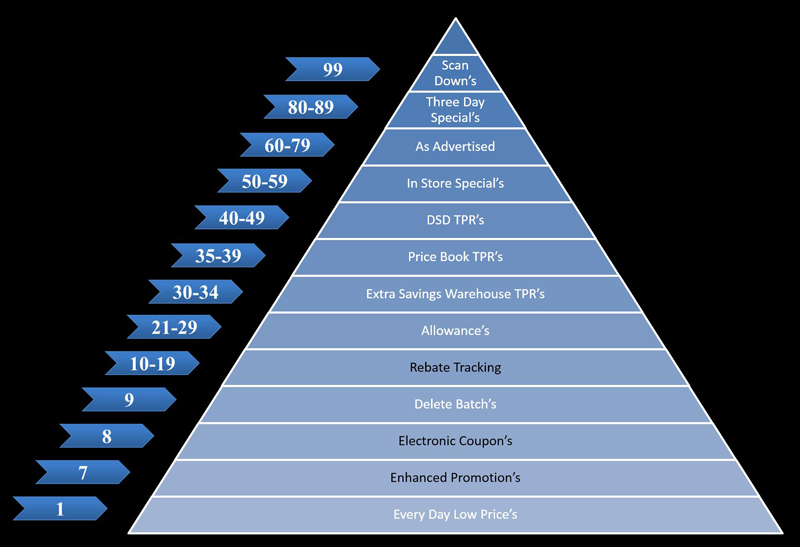
S4 Sales and Promotions provides a robust priority pyramid for managing your marketing schemes: building weekly ads, manager’s specials, frequent shopper promos, and electronic coupons — all coordinated so the right price wins at the lane.
How it works
Nested sales and promotions. Schedules can overlap, activate, and deactivate based on power levels and dates. A category-wide sale, a vendor-funded promotion, a weekly ad, and a manager’s special can all coexist on the same item — S4 handles the order of operations.
Best Price option. When promotions stack, the Best Price option ensures the customer always gets the lowest valid price at the lane. No manual reconciliation, no awkward conversations at checkout.
Automated activation and deactivation. Set the date, set the time, and S4 turns the promo on and off across the store — and across all your stores if you’re on S4 Enterprise.
Direct POS interface. S4 Marketing speaks directly to the promotional capabilities of every supported POS — NCR Voyix ISS45 (V7 & V8), ScanMaster, LogiVision, IBM, and NCR Voyix Radiant RPOS for C-stores.
What this changes for store teams
- No more end-of-week scramble to manually deactivate yesterday’s promos
- Frequent shopper pricing, electronic coupons, and standard sales coordinated in one place
- Ad-day staffing focused on signage and merchandising — not on punching in promo flags
- The same promo definitions reusable across stores via S4 Enterprise
What feeds in, what flows out
Marketing reads from your S4 pricebook and item maintenance — the same items, the same categories, the same vendors. When you build a promo, you can attach signage (shelf tags, sale signs) via S4 Shelf Image, and the resulting performance is measurable in Analysis and S4Vision after the campaign.
Talk to S4 about Marketing
If your current promotional workflow involves spreadsheets, sticky notes, or coordination spreadsheets between stores, we’d be happy to show you how S4 handles it.
Email: sales@s4.com Phone: (844) 747-4400
See Marketing, Sales & Promotions With Your Own Store Data
Tell us your POS, what you're running today, and what's slowing your workflow. We'll spin up a 30-minute walkthrough of Marketing, Sales & Promotions with your real items — no slides.
- No card, no commitment — ever.
- Not added to any list. Reply 'stop' once and we stop.
- Walkthrough recorded so you can share with your team.