S4 Back Office — New Features
The current S4 Back Office release rebuilds the parts of the suite store managers spend the most time in: item…
Key features
Easier to learn, faster to use
App-style flow, workstation-level user settings, field-level security, configurable grids per user.
Item maintenance, rebuilt
Partial-text search, item filter and sort wizard, customizable grids, Excel/CSV export from any grid.
High-output batch handling
New ISS45 promo interface, right-click batch activation, integrated sign and label printing.
Improved inventory
Full history of counts, receivers, POs, transfers. Cost-change handling at receiving, case/carton/each linking, auto-replenish POs.
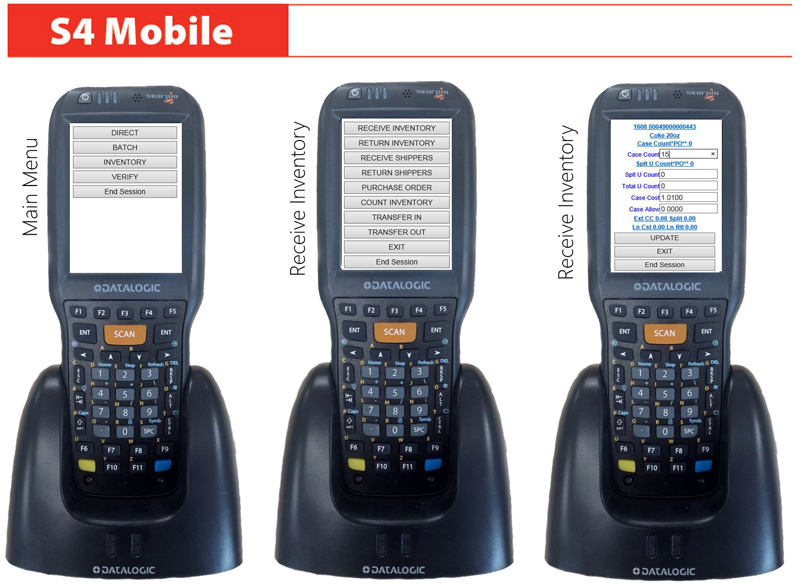
S4 Mobile + Data Logic Axist
5–16 connections, custom scripts per task, new Android handheld certified for S4 Mobile and S4Vision.
Integrated reporting
PDF/Excel/custom exports, email scheduling, role-based read/write/visible security across every report.
What's included
- Microsoft SQL Express default is 7× the prior S4 default size
- Cloud licensing — S4License Service replaces hardware USB/parallel keys
- Direct Ishida scale integration via SLPV-5
- Item stats — selling velocity today, this week, month, and year
- Competitive price-shopping via Android or iPhone — collect, compare, model your response
The current S4 Back Office release rebuilds the parts of the suite store managers spend the most time in: item maintenance, batch work, reporting, and mobile access.
This page covers the highlights. If you want the full feature list, ask your S4 dealer or request the release notes.
Easier to learn, faster to use
The screens are designed for an app-style flow that’s easier to train new users on and faster for power users to navigate.
- New menu navigation built for high-turnover store environments
- Workstation-level settings per user
- User security configurable down to the field — what can be seen, what can be changed
- Grid functions arranged and saved per user
- Configurable screen sizes for any monitor or multi-monitor setup
- Separate-instance support — open a second S4 alongside your current work
Easy-to-use item maintenance
- Partial-text searches by code or description
- Item Filter and Sort Wizard for working on a subset of items
- Customizable columns and grid layouts
- Export from any grid to Excel or CSV
- Print any grid as a quick custom report
- User comments and tags (`#GlutenFree`, `#LowCarb`, `#Seasonal`, `#CostChange`)
- Expanded categorization fields and levels
- e-Commerce synchronization built into item maintenance
- Item stats — selling velocity today, amount sold this week/month/year, last-sold and create dates
Improved batch and promotion handling
- New interface for ISS45 promotions including expanded groups, threshold rewards, and Department/Likecode/MixMatch links
- High-output batch activation and deactivation — right-click on the grid to activate
- Integrated sign and label functions for advertising
- Competitive price-shopping via Android or iPhone — collect prices, compare and model your response
Improved inventory maintenance
- Full history of past counts, receivers, purchase orders, transfers, and adjustments
- Adjust quantity-on-hand at receiving time
- Cost-change handling at receiving — capture discrepancies from agreed deals
- Right-click receiver posting
- Case/carton/each unit linking for combined QOH
- Auto-replenish purchase orders based on stock volume
- Alpha-numeric item codes for select vendors
- Invoice comments and tags
- Worksheets for controlled inventory counts
S4 Mobile and Data Logic Axist
- S4Mobile service — 5 connections on Windows 7/8, up to 16 on Windows Server
- Custom scripts per task
- Print to any connected printer
- New Data Logic Axist Android device certified — runs S4 Mobile, S4Vision, and remote desktop
Best-in-class platforms
- Microsoft SQL — managed, multi-user database, Windows 10 Pro and Windows Server support, 32-bit and 64-bit. Express size default is 7× the prior S4 default.
- Import/Export — mapping utility, vendor templates, S4 generic spreadsheets, support for major warehouse suppliers, SQL query tool, auto-backup routines.
- Scale management — direct Ishida integration via SLPV-5, limited PLUM and ADC interfaces.
- Cloud licensing — S4License Service replaces hardware USB/parallel keys. Software-as-a-service and trial editions supported.
Reporting
New integrated reporting with PDF/Excel/custom exports and email scheduling. Sales reports, tender reports, time-of-day reports, market basket, loss prevention, inventory, financials, batch reports, audit reports, role-based read/write/visible security.
Coming soon
New S4Vision integrations. Electronic Journal ticket search. New help system.
Talk to S4 about Back Office
The release notes have the full list. We’re happy to walk through what’s changed if you’re on an older version, or what the new features mean for a new deployment.
Email: sales@s4.com
See S4 Back Office — New Features With Your Own Store Data
Tell us your POS, what you're running today, and what's slowing your workflow. We'll spin up a 30-minute walkthrough of S4 Back Office — New Features with your real items — no slides.
- No card, no commitment — ever.
- Not added to any list. Reply 'stop' once and we stop.
- Walkthrough recorded so you can share with your team.